Cusor那点事
今天写一个登陆界面,到最后判断账号密码的时候,看了一些别人的源码,用到了下面的代码:1
2
3
4
5
6
7
8
9
10public boolean isRight(String edit_account, String edit_password){
SQLiteDatabase db = dbHelper.getWritableDatabase();
String sql = "Select * from usertable where username = ? and password = ?";
Cursor cursor = db.rawQuery(sql, new String[]{edit_account, edit_password});
if(cursor.moveToFirst()){
cursor.close();
return true;
}
return false;
}
emmm~ Cusor 王德发!!!!!这是啥 ?
上网搜索了一下,cusor是英语‘光标’的意思
关于 Cursor
在你理解和使用 Android Cursor 的时候你必须先知道关于 Cursor 的几件事情:
Cursor 是每行的集合。使用 moveToFirst() 定位第一行。你必须知道每一列的名称。你必须知道每一列的数据类型。Cursor 是一个随机的数据源。所有的数据都是通过下标取得。
关于 Cursor 的重要方法:
2
3
4
5
6
7
8
9
10
11
12
13
14
15
16
17
18
c.moveToFirst(); //移动到第一行
c.moveToLast(); //移动到最后一行
c.moveToPosition(int position); //移动到指定行
c.moveToPrevious(); //移动到前一行
c.moveToNext(); //移动到下一行
c.isFirst(); //是否指向第一条
c.isLast(); //是否指向最后一条
c.isBeforeFirst(); //是否指向第一条之前
c.isAfterLast(); //是否指向最后一条之后
c.isNull(int columnIndex); //指定列是否为空(列基数为0)
c.isClosed(); //游标是否已关闭
c.getCount(); //总数据项数
c.getPosition(); //返回当前游标所指向的行数
c.getColumnIndex(String columnName);//返回某列名对应的列索引值,如果不存在返回-1
c.getString(int columnIndex); //返回当前行指定列的值
c·getColumnIndexOrThrow(String columnName)——从零开始返回指定列名称,如果不存在将抛出IllegalArgumentException 异常。
c.close()——关闭游标,释放资源
关于cusor的应用,可以看看以下代码:
2
3
4
5
6
7
8
9
10
11
12
13
14
15
16
17
18
19
20
21
22
23
24
25
query.setOnClickListener(new OnClickListener(){
@Override
public void onClick(View v) {
SQLiteDatabase db=dbHelper.getWritableDatabase();
//查询Book表中的所有的数据
//Cursor cursor=db.query("Book", null, null, null, null, null, null);
Cursor cursor=db.rawQuery("Select * from Book", null);
if(cursor.moveToFirst()){
do{
//遍历Cursor对象,取出数据并打印
String name=cursor.getString(cursor.getColumnIndex("name"));
String author=cursor.getString(cursor.getColumnIndex("author"));
int pages=cursor.getInt(cursor.getColumnIndex("pages"));
double price=cursor.getDouble(cursor.getColumnIndex("price"));
Log.d("MainActivity","book name is"+name);
Log.d("MainActivity","book author is"+author);
Log.d("MainActivity","book pages is"+pages);
Log.d("MainActivity","book price is"+price);
}while(cursor.moveToNext());
}
cursor.close();
}
});
访问Cusor的下标获取数据
2
String name = cur.getString(nameColumnIndex);
循环 Cursor 取出我们需要的数据
2
3
4
5
6
//光标移动成功
String email = cursor.getString(cursor.getColumnIndex(RuiXin.EMAIL));
startManagingCursor(cursor); //查找后关闭游标
//把数据取出
}
当cur.moveToNext() 为假时将跳出循环,即 Cursor 数据循环完毕
用 for 循环而不想用While 循环
·isBeforeFirst()——返回游标是否指向之前第一行的位置
·isAfterLast()——返回游标是否指向第最后一行的位置
·isClosed()——如果返回 true 即表示该游戏标己关闭
有了以上的方法,可以如此取出数据1
2
3
4
5
6
7for(cur.moveToFirst();!cur.isAfterLast();cur.moveToNext())
{
int nameColumn = cur.getColumnIndex(People.NAME);
int phoneColumn = cur.getColumnIndex(People.NUMBER);
String name = cur.getString(nameColumn);
String phoneNumber = cur.getString(phoneColumn);
}
Cusor解析
一般情况下:1
2
3
4SQLiteDataBase
db;
Cursor
cursor = db.query(各种参数);
这时,就出现了网上的解释了,说cursor是每行的集合。
现在先解释一下SQLite数据库中是怎么存放数据的,是以表的形式存放的,看这个表Student
position | id | name | gender | age | city
|–|–|—|–|–|–|
0 |1 |张三| 男|19|山东
1|2|李四|男|20|上海
3|4|王五|男|34|广西
4|5|牛大花|女|17|天津
5|6|光绪|男|24|北京
所以这个每行的集合的意思,是获得的满足条件(就是我们query方法中传入的条件参数)的所有行。
比如我要在这个表中找gender为男的,那么获得到的cursor就包含了张三行,李四行,王五行,光绪行。
遍历cursor内容的时候,为什么要先moveToFirst()?
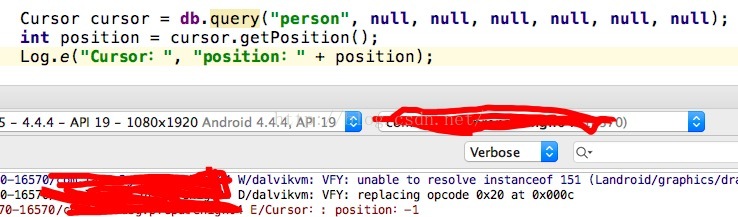
我们不进行moveToFirst()操作,我们获取游标对象后,直接输出它当前的position值
可以看到,输出的值是-1。
position | id | name | gender | age | city
|–|–|—|–|–|–|
-1 |null|null|null|null|null
0 |1 |张三| 男|19|山东
1|2|李四|男|20|上海
3|4|王五|男|34|广西
4|5|牛大花|女|17|天津
5|6|光绪|男|24|北京
也就是说,现在光标在第零行之前。
所以我们使用moveToFirst后在输出position就会发现position=0了,使用moveToNext也可以。
moveToNext如何得知是否已经遍历完毕呢?
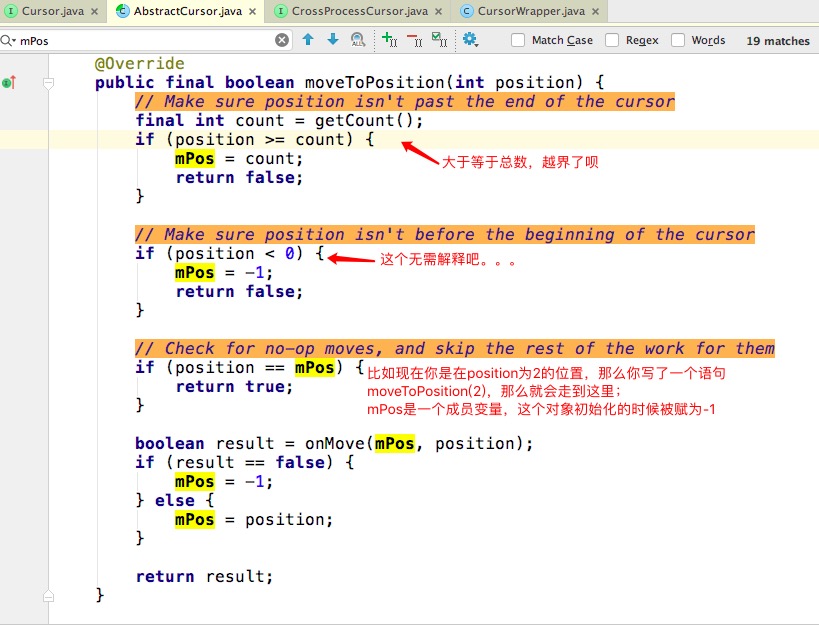
我们翻看源码,会发现moveToFirst,moveToNext,moveToLast,moveToPrevious等最后都会执行到这个方法
图中说的:这个对象在初始化的时候,指的就是当前页面的那个对象。mPos=-1被写在一个空参构造方法里了。
看源码的时候也能发现:
moveToFirst调用的是moveToPosition(0)
moveToNext调用的是moveToPosition(mPos+1)
所以如果是第一次调用的话,这两句话的意思是一样的(开始mPos=-1)。
那么现在来看之前的代码
1 | if(cursor.moveToFirst()){//用来判断是否遍历并且是否存在这样一组account&password |
本文参考文章
Android中的Cursor到底是什么?如何理解Cursor的方法都在做什么事情?
Android笔记——关于Cursor类的介绍